JSON ⇔ YAML Converter
Convert between JSON and YAML, including multi-document YAML (--- separated) to and from JSON arrays — useful for config file format conversion and data inspection.
Applies to JSON → YAML only, for files that list several documents, such as Kubernetes manifests. YAML → JSON combines several documents into an array whether or not this is ticked.
How to use
- Paste JSON or YAML into the text area
- Press "JSON → YAML" or "YAML → JSON"
- The converted result appears below, and you can copy it with "Copy"
The app does not detect which format you pasted. It converts in the direction of the button you press. Editing the input or changing the checkbox removes the displayed result and error, so press a button again.
Internally, a YAML 1.2-compatible parser (js-yaml) runs entirely in your browser.
Example
Entering {"name": "Alice", "age": 30} and pressing "JSON → YAML" produces:
name: Alice
age: 30
JSON with nested objects and arrays converts as well. Enter this JSON:
{ "service": { "name": "web", "ports": [80, 443], "env": { "DEBUG": false } } }
"JSON → YAML" gives this result:
service:
  name: web
  ports:
    - 80
    - 443
  env:
    DEBUG: false
Entering that YAML and pressing "YAML → JSON" returns JSON formatted with two-space indentation.
Multi-document YAML (--- separated)
YAML that lists several documents in one file, separated by ---, such as Kubernetes manifests, converts as well.
- YAML → JSON: two or more documents are combined into a JSON array in the order they appear, and a line above the result says so, for example "Combined 2 documents into a JSON array, in the order they appear." A single document is converted on its own, without an array.
- Empty documents: a document with nothing in it, or only comments, such as after a trailing
---or between two---lines, is left out, and the number left out is shown. A document written as the valuenull, such as--- nullor--- ~, is kept asnull. - Anchors: an anchor (
&name) can only be used inside the document that defines it. Referring to an anchor from another document with*namegives the errorunidentified alias. - JSON → YAML: with "Split a top-level array into documents separated by ---" ticked, each item of the array becomes its own document, with a
---line between them. When the top level is not an array, or the array is empty, it is written as one document and the reason is shown. An array with one item becomes a document of that item alone, so converting it back with "YAML → JSON" gives the item without the enclosing array. Without the tick, an array is written as one YAML list of-lines.
For example, enter this YAML and press "YAML → JSON".
kind: Service
name: web
---
kind: Deployment
replicas: 2
---
The document after the last --- is empty, so it is left out and the result is this array:
[
  {
    "kind": "Service",
    "name": "web"
  },
  {
    "kind": "Deployment",
    "replicas": 2
  }
]
Entering that array, ticking the box and pressing "JSON → YAML" gives back the original YAML without the trailing ---.
How values are read in YAML → JSON
The type of an unquoted value follows the YAML 1.2 core schema.
true/True/TRUEandfalse/False/FALSEbecome booleansyes,no,on, andoffstay strings, not booleansnull/Null/~and a key with no value becomenull0o17is read as octal and becomes15;0x1Fis read as hexadecimal and becomes31.017is the decimal number171e3becomes1000- Dates and times such as
2026-10-11and12:30:00stay strings - A key that is not written as a string, such as
1: aortrue: b, becomes the string key"1"or"true"in JSON - A multi-line string written with
|becomes one string that contains the line breaks as\n
Output format in JSON → YAML
- Indentation is two spaces. Keys keep the order of the input, except that keys that read as whole numbers, such as
"2"and"10", come first in ascending order - Arrays are written on lines starting with
-; an empty array and an empty object become[]and{} - Strings that would read as another type without quotes, such as
"yes","123","true","null", and"2026-10-11", and strings containing characters such as a comment sign, are wrapped in single quotes, for example'123' - A string containing line breaks is written in block style, using
|-,|or|+depending on its trailing line breaks - A long string of roughly 80 characters or more that contains spaces is written over several lines in the
>-folded style. Reading it back gives the original single string. A string without spaces stays on one line however long it is - When the same key appears twice in the JSON, only the later value is kept
Common errors and fixes
Syntax errors are shown as the parser returns them, in English. YAML errors include the line and column of the problem. When the app itself stops a conversion (no YAML to convert, a number that cannot be kept exactly, or a result that is too large), the reason is shown in the page language.
- Trailing commas, single quotes, and comments in JSON:
{"a": 1,}and{'a': 1}are not valid JSON and cause an error. Remove the comma and use double quotes. - Tabs in YAML indentation: the message is
tab characters must not be used in indentation. Replace the tabs with spaces. - Misaligned YAML indentation: the message is
bad indentation of a mapping entry. Align the keys of the same level. - Duplicate YAML keys: two identical keys at the same level give
duplicated mapping key. - Empty input or YAML with only comments: in "YAML → JSON", empty input, YAML with only comments, and YAML with only
---give a message in the page language that there is no YAML to convert. In "JSON → YAML", empty input gives the JSON parser's error. !!binaryand custom tags: the message isunknown scalar tag. Remove the tag or rewrite the value as a string.- Result too large: YAML → JSON stops when the result would pass 5 million characters, counted with its line breaks and indentation. Every alias (
*name) is written out in full where it is used, so a value made of aliases that is itself aliased many times can turn a few hundred characters of YAML into more than 100 MB. Use fewer aliases or convert the YAML in parts.
How your data is handled
Conversion runs entirely in this browser. The JSON or YAML you enter is not sent to a server and is not saved. Reloading the page clears the input and the result.
FAQ
Are YAML comments and anchors (&/*) supported?
When converting YAML → JSON, comments are ignored and anchors/aliases are resolved to their expanded values. When converting JSON → YAML, comments are not emitted (JSON has no concept of comments).
Is the merge key (<<) supported?
No. The merge key << is a YAML 1.1 extension that is not part of the YAML 1.2 core schema, so it is not expanded and is treated as an ordinary key named <<. For example, b: {<<: *x, j: 2} does not merge the contents of *x into b; the resulting JSON has a "<<" key holding the aliased value. To convert YAML that relies on merge keys, such as docker-compose files, rewrite it in expanded form first.
Why does version: 1.10 become 1.1?
An unquoted 1.10 is read as a number, so it becomes 1.1 in JSON. In the same way 1.0 becomes 1 and 00123 becomes 123. For values whose digits must stay as written, such as version numbers and postal codes, quote them as strings, for example "1.10".
Why do yes and on not become true?
In the YAML 1.2 core schema, the only booleans are true and false (including the capitalized and all-uppercase spellings). Treating yes, no, on, and off as booleans is the YAML 1.1 reading, and this app outputs them as strings. Rewrite them as true / false if you want booleans.
What happens if conversion fails?
An error message is shown for invalid syntax. Non-finite numbers such as .nan and .inf, which JSON cannot represent, also cause a conversion error instead of being replaced with null. Quote them, for example as ".nan", to preserve them as strings. For the same reason, numbers outside the safe integer range (±9007199254740991), such as 12345678901234567890, cause a conversion error instead of being output as a rounded value, whether they appear as a value or as a numeric YAML key. Quote them to keep every digit as text.
Are multi-document YAML files (--- separated) supported?
Yes. "YAML → JSON" combines two or more documents separated by --- into a JSON array in the order they appear, leaving out empty documents. To turn a JSON array into multi-document YAML, tick "Split a top-level array into documents separated by ---" and press "JSON → YAML". See "Multi-document YAML (--- separated)" above for details.
Can I use it just to format JSON?
Most JSON can also be read as YAML, so pasting JSON and pressing "YAML → JSON" gives JSON formatted with two-space indentation. It still stops with an error if the JSON contains an integer outside the safe range.
- Type
- Utility
- Category
- Developer
- Tags
- json
- yaml
- converter
- developer
Guides related to this app
What to check when converting between YAML and JSON
Understand how comments, types, anchors, and keys can be lost or change meaning during YAML and JSON conversion.
Convertersyamljsonconversion
Related apps
docker run to Docker Compose Converter (compose.yaml)
Paste docker run commands and get a compose.yaml. Reads every docker run option, including ports, environment, volumes, networks, health checks and GPUs, merges several commands into one file, rewrites $(pwd) and $ for Compose, and flags options Compose cannot express.
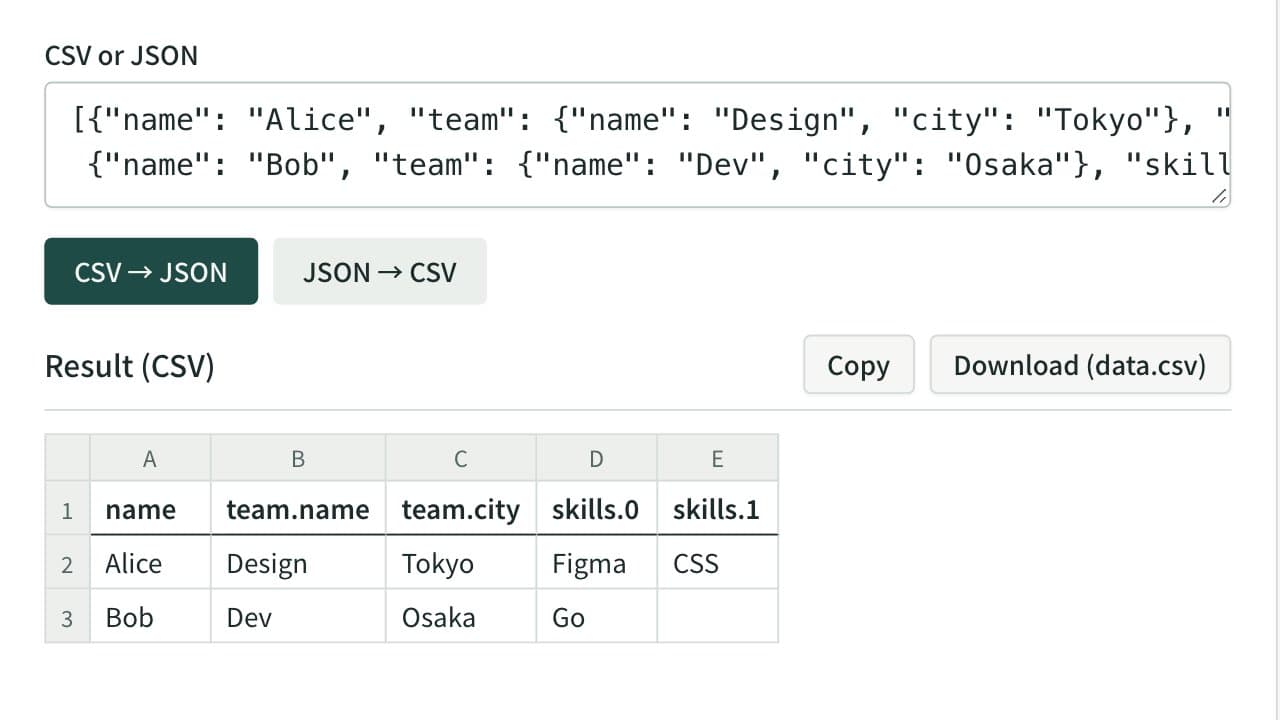
CSV ⇔ JSON Converter
Convert between CSV or tab-separated text and JSON — turn a spreadsheet table into JSON, or a JSON array back into rows and columns. Nested JSON is expanded into columns such as address.city. Download the result as a CSV file that Excel opens without garbled text.
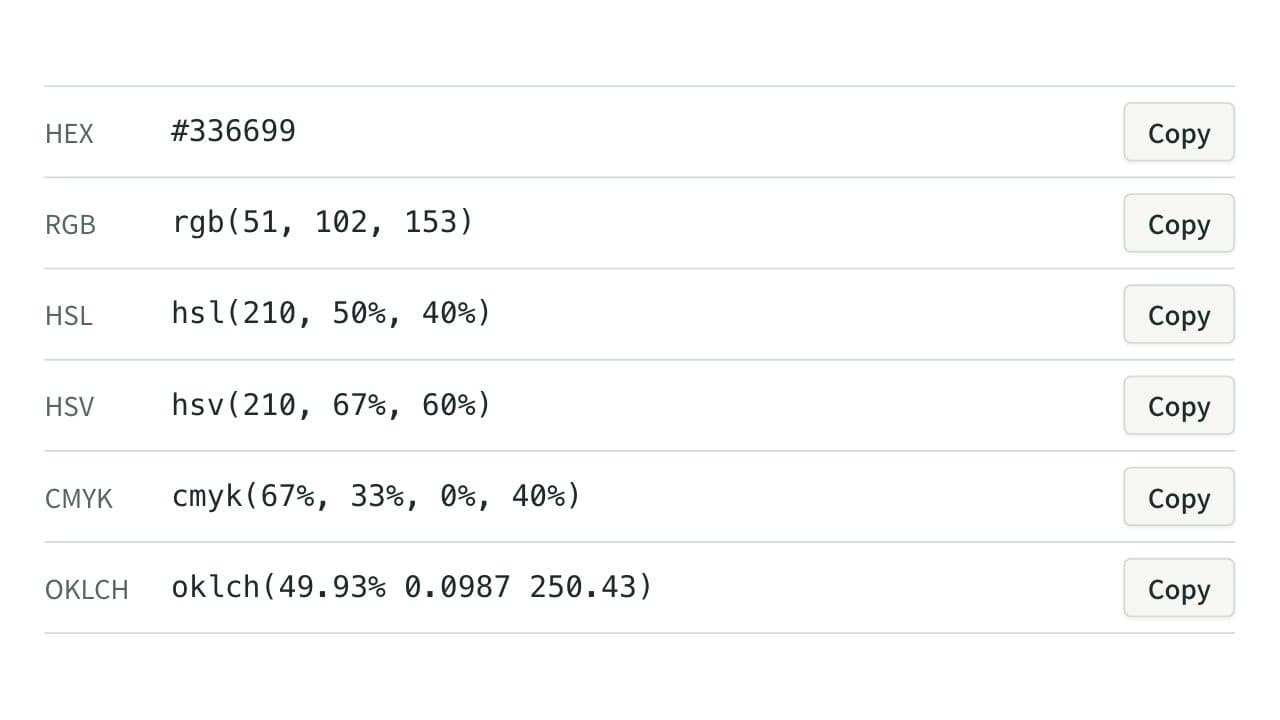
Color Code Converter
Convert colors between HEX, RGB, and HSL, and see them in HSV, CMYK, and OKLCH too, with a color picker, a live preview, and WCAG contrast ratios against white, black, or any text color you choose.